

Price Match Guarantee

In-stock parts ship the same day

365-Day Return Policy
Price Match GuaranteeGET PRO PRICING
Video & Articles: Appliance & Equipment RepairWhirlpool/ Kenmore Gas Dryer Replace Thermistor #8577274


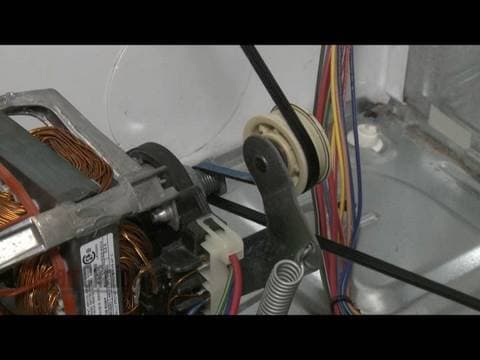

Whirlpool/ Kenmore Gas Dryer Replace Thermistor #8577274
Skill Level
Total Parts Cost
$32.63Estimated Savings
$112.5003:53
- Description
This video provides step-by-step repair instructions for replacing the thermistor on a Whirlpool dryer model #11079832800 . The most common reasons for replacing the thermistor are when the dryer takes too long or won’t stop.
All of the information for this heating element replacement video is applicable to the following brands: Whirlpool, Kenmore, Maytag, KitchenAid, Amana, Crosley, Inglis
Tools needed: hex socket, flat head screwdriver, Phillips head screwdriver
All of the information for this heating element replacement video is applicable to the following brands: Whirlpool, Kenmore, Maytag, KitchenAid, Amana, Crosley, Inglis
Tools needed: hex socket, flat head screwdriver, Phillips head screwdriver
Step By Step Instructions
1
As with any repair, be sure you’ve unplugged the appliance before beginning.
2
Your first step is to detach the control panel. Depending on your model, you will either insert a putty knife under the panel to release the two clips or you will pull off both plastic end caps and remove the screws found underneath.
3
Now, rotate the control panel up.
4
Remove the screws securing the main top and slide the top off.
5
Next, insert a flathead screwdriver between the upper and lower front panels to release the two clips and detach the lower panel.
6
Remove the upper panel mounting screws along with the lint screen duct screw and, if applicable, the screw securing the grounding wire.
7
Detach the moisture sensor wire and the two door springs.
8
Now, disconnect the door switch wire connector remove the screws from the top of the upper panel and lift the upper panel off.
9
Depress the pulley to release the belt tension and unthread the belt from the pulley and motor shaft.
10
Now use the belt to lift out the drum.
11
If still intact, disconnect the wires from the old thermistor and remove the mounting screws to release the thermistor assembly.
12
Install the new thermistor assembly
13
By aligning its position and securing it with the mounting screws.
14
Reconnect the wires.
15
Now, replace the drum by aligning its rim on the two rear rollers and loop the belt around the tension pulley and motor shaft in a “zig-zag” formation.
16
Rotate the drum to help align the belt.
17
Replace the upper front panel by aligning the two rollers on the drum rim and positioning the top lip of the panel on the cabinet brackets.
18
Replace all four panel screws along with the lint screen duct screw and, if applicable, the screw securing the grounding wire.
19
Reattach the moisture sensor wire and the door springs.
20
Now, replace the lower front panel by snapping it into position.
21
Reconnect the door switch wire connector at the top of the dryer.
22
Slide the main top on and secure it with the screws.
23
Rotate the control panel down and lock it into place.
24
If applicable, replace the screws and end caps.
25
You’re now ready to plug the appliance back in to make sure it’s functioning properly.
Description
This video provides step-by-step repair instructions for replacing the thermistor on a Whirlpool dryer model #11079832800 . The most common reasons for replacing the thermistor are when the dryer takes too long or won’t stop.
All of the information for this heating element replacement video is applicable to the following brands: Whirlpool, Kenmore, Maytag, KitchenAid, Amana, Crosley, Inglis
Tools needed: hex socket, flat head screwdriver, Phillips head screwdriver
All of the information for this heating element replacement video is applicable to the following brands: Whirlpool, Kenmore, Maytag, KitchenAid, Amana, Crosley, Inglis
Tools needed: hex socket, flat head screwdriver, Phillips head screwdriver
Step-By-Step Instructions
1
As with any repair, be sure you’ve unplugged the appliance before beginning.
2
Your first step is to detach the control panel. Depending on your model, you will either insert a putty knife under the panel to release the two clips or you will pull off both plastic end caps and remove the screws found underneath.
3
Now, rotate the control panel up.
4
Remove the screws securing the main top and slide the top off.
5
Next, insert a flathead screwdriver between the upper and lower front panels to release the two clips and detach the lower panel.
6
Remove the upper panel mounting screws along with the lint screen duct screw and, if applicable, the screw securing the grounding wire.
7
Detach the moisture sensor wire and the two door springs.
8
Now, disconnect the door switch wire connector remove the screws from the top of the upper panel and lift the upper panel off.
9
Depress the pulley to release the belt tension and unthread the belt from the pulley and motor shaft.
10
Now use the belt to lift out the drum.
11
If still intact, disconnect the wires from the old thermistor and remove the mounting screws to release the thermistor assembly.
12
Install the new thermistor assembly
13
By aligning its position and securing it with the mounting screws.
14
Reconnect the wires.
15
Now, replace the drum by aligning its rim on the two rear rollers and loop the belt around the tension pulley and motor shaft in a “zig-zag” formation.
16
Rotate the drum to help align the belt.
17
Replace the upper front panel by aligning the two rollers on the drum rim and positioning the top lip of the panel on the cabinet brackets.
18
Replace all four panel screws along with the lint screen duct screw and, if applicable, the screw securing the grounding wire.
19
Reattach the moisture sensor wire and the door springs.
20
Now, replace the lower front panel by snapping it into position.
21
Reconnect the door switch wire connector at the top of the dryer.
22
Slide the main top on and secure it with the screws.
23
Rotate the control panel down and lock it into place.
24
If applicable, replace the screws and end caps.
25
You’re now ready to plug the appliance back in to make sure it’s functioning properly.
Applicable Product Model


Related Articles & Videos




Our Story
Family-owned and operated since 1912, Burke America Parts Group is the longest-running genuine appliance, HVAC, and outdoor power equipment parts solution in North America. At Repair Clinic, we're proud to be an international brand trusted by the pros as well as the DIY community.
About Repair Clinic
© 2026 RepairClinic.com