

Price Match Guarantee

In-stock parts ship the same day

365-Day Return Policy
Price Match GuaranteeGET PRO PRICING
Video & Articles: Appliance & Equipment RepairKitchenAid Convection Gas Range Cooling Fan Assembly Replacement #W11107275 


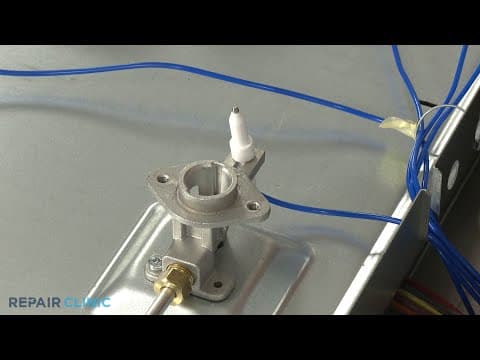

KitchenAid Convection Gas Range Cooling Fan Assembly Replacement #W11107275
Skill Level
Total Parts Cost
$83.94Estimated Savings
$112.5009:43
- Description
This video provides step-by-step repair instructions for replacing the cooling fan assembly on a Kitchenaid Gas Convection Range (model #KSGB900ESS01). The most common reason for replacing the fan is if the oven is overheating.
This fan replacement video is applicable to the following brands:
Whirlpool, Kitchenaid
Don't forget to like and comment on this video and subscribe to our channel!
This fan replacement video is applicable to the following brands:
Whirlpool, Kitchenaid
Don't forget to like and comment on this video and subscribe to our channel!
Step By Step Instructions
1
Convection Gas Range - Ksgb900ess1
2
Kitchenaid Convection Gas Range - Cooling Fan Assembly Replacement
3
You will need a flat-head screwdriver and a phillips-head screwdriver to complete this repair.
4
Shock
5
Unplug the power cord or shut off the power supply.
6
Fire
7
Shut off the gas supply as well.
8
Confirm that you can easily access the rear of the range then open the oven door and use a phillips-head screwdriver to unthread the screws securing the control panel?s lower cover.
9
Sharp
10
Remove the cover.
11
Pull off the five control knobs.
12
Next, unthread the two screws securing the control panel to the frame.
13
Detach the control panel and support it to avoid straining the wires.
14
Now unthread the front bracket screws securing the main top.
15
Unthread the two screws underneath the rear corners of the top.
16
Heavy
17
Lift off both grates.
18
Remove all five burner caps and burner bases.
19
You can now unthread the screws securing the orifice holders to the main top.
20
Sharp
21
With the screws unthreaded, you can lift off the top.
22
Using the phillips-head screwdriver, unthread the two screws securing the lower rear access panel.
23
Sharp
24
Lift the panel up and out to remove.
25
Unthread the three screws to release the left side stop bracket.
26
Repeat to detach the right side bracket.
27
Now lift the upper rear access panel up to remove.
28
Next, unthread the two screws securing the orifice holder support panel to the left side panel.
29
Unthread the four remaining screws securing the side panel.
30
Now use a flat-head screwdriver to depress the retaining tab at the rear and you can fully detach the panel.
31
Unthread the mounting screw securing the fan assembly to the left front bracket.
32
Push the fan assembly back to detach and you can pull it out.
33
Disconnect the wire connecters to fully release the old assembly.
34
Prepare the new cooling fan assembly for installation, by transferring the seal from the old assembly to the new one?or install a new seal.
35
Now connect the wire connecters.
36
Align the fan assembly tabs with the panel slots and push the assembly forward.
37
Thread the mounting screw to secure the assembly to the bracket.
38
Reinstall the side panel by aligning the frame tabs with the slots on the front of the panel, then snap the panel into position.
39
secure it with the screws.
40
Replace the screws securing the orifice holder support panel to the side panel.
41
Reinstall the upper rear access panel by hooking it on the tabs.
42
Realign the two stop brackets and thread the screws to hold them in place.
43
Reinstall the lower access panel by inserting the tabs in the slots first.
44
Lower the panel and secure it with the screws.
45
Reposition the main top on the frame so the spark electrodes protrude through the holes in the top.
46
Confirm that the orifice holders are aligned?then thread and tighten the screws to secure the holders to the main top.
47
Replace each burner base in its proper location by aligning the notch in the base with the spark electrode.
48
Replace the burner caps.
49
Reposition the grates.
50
Thread the two rear screws to secure the main top.
51
Replace the front bracket screws.
52
Realign the control panel on the front brackets.
53
Secure it with the screws.
54
Replace the lower cover, then thread the screws to secure.
55
Realign the control knobs on the valve stems and push them into place ? note that the power burner control knob should be placed on the second stem from the left.
56
Turn the gas supply back on.
57
Plug the power cord back in or restore the power supply.
58
Turn the gas supply back on.
Description
This video provides step-by-step repair instructions for replacing the cooling fan assembly on a Kitchenaid Gas Convection Range (model #KSGB900ESS01). The most common reason for replacing the fan is if the oven is overheating.
This fan replacement video is applicable to the following brands:
Whirlpool, Kitchenaid
Don't forget to like and comment on this video and subscribe to our channel!
This fan replacement video is applicable to the following brands:
Whirlpool, Kitchenaid
Don't forget to like and comment on this video and subscribe to our channel!
Step-By-Step Instructions
1
Convection Gas Range - Ksgb900ess1
2
Kitchenaid Convection Gas Range - Cooling Fan Assembly Replacement
3
You will need a flat-head screwdriver and a phillips-head screwdriver to complete this repair.
4
Shock
5
Unplug the power cord or shut off the power supply.
6
Fire
7
Shut off the gas supply as well.
8
Confirm that you can easily access the rear of the range then open the oven door and use a phillips-head screwdriver to unthread the screws securing the control panel?s lower cover.
9
Sharp
10
Remove the cover.
11
Pull off the five control knobs.
12
Next, unthread the two screws securing the control panel to the frame.
13
Detach the control panel and support it to avoid straining the wires.
14
Now unthread the front bracket screws securing the main top.
15
Unthread the two screws underneath the rear corners of the top.
16
Heavy
17
Lift off both grates.
18
Remove all five burner caps and burner bases.
19
You can now unthread the screws securing the orifice holders to the main top.
20
Sharp
21
With the screws unthreaded, you can lift off the top.
22
Using the phillips-head screwdriver, unthread the two screws securing the lower rear access panel.
23
Sharp
24
Lift the panel up and out to remove.
25
Unthread the three screws to release the left side stop bracket.
26
Repeat to detach the right side bracket.
27
Now lift the upper rear access panel up to remove.
28
Next, unthread the two screws securing the orifice holder support panel to the left side panel.
29
Unthread the four remaining screws securing the side panel.
30
Now use a flat-head screwdriver to depress the retaining tab at the rear and you can fully detach the panel.
31
Unthread the mounting screw securing the fan assembly to the left front bracket.
32
Push the fan assembly back to detach and you can pull it out.
33
Disconnect the wire connecters to fully release the old assembly.
34
Prepare the new cooling fan assembly for installation, by transferring the seal from the old assembly to the new one?or install a new seal.
35
Now connect the wire connecters.
36
Align the fan assembly tabs with the panel slots and push the assembly forward.
37
Thread the mounting screw to secure the assembly to the bracket.
38
Reinstall the side panel by aligning the frame tabs with the slots on the front of the panel, then snap the panel into position.
39
secure it with the screws.
40
Replace the screws securing the orifice holder support panel to the side panel.
41
Reinstall the upper rear access panel by hooking it on the tabs.
42
Realign the two stop brackets and thread the screws to hold them in place.
43
Reinstall the lower access panel by inserting the tabs in the slots first.
44
Lower the panel and secure it with the screws.
45
Reposition the main top on the frame so the spark electrodes protrude through the holes in the top.
46
Confirm that the orifice holders are aligned?then thread and tighten the screws to secure the holders to the main top.
47
Replace each burner base in its proper location by aligning the notch in the base with the spark electrode.
48
Replace the burner caps.
49
Reposition the grates.
50
Thread the two rear screws to secure the main top.
51
Replace the front bracket screws.
52
Realign the control panel on the front brackets.
53
Secure it with the screws.
54
Replace the lower cover, then thread the screws to secure.
55
Realign the control knobs on the valve stems and push them into place ? note that the power burner control knob should be placed on the second stem from the left.
56
Turn the gas supply back on.
57
Plug the power cord back in or restore the power supply.
58
Turn the gas supply back on.
Applicable Product Model

Related Articles & Videos
05:55
Part Replacement
Kitchenaid Electric Slide-In Range Cooling Fan Replacement #W11107275
08:32
Part Replacement
KitchenAid Convection Gas Range Main Control Board Replacement #W11100100
05:52
Part Replacement
KitchenAid Convection Gas Range Control Panel Replacement #W10913685
07:53
Part Replacement
KitchenAid Convection Gas Range Right Rear Burner Spark Electrode Replacement #W11220383




Our Story
Family-owned and operated since 1912, Burke America Parts Group is the longest-running genuine appliance, HVAC, and outdoor power equipment parts solution in North America. At Repair Clinic, we're proud to be an international brand trusted by the pros as well as the DIY community.
About Repair Clinic
© 2026 RepairClinic.com