

Price Match Guarantee

In-stock parts ship the same day

365-Day Return Policy
Price Match GuaranteeGET PRO PRICING
Video & Articles: Appliance & Equipment RepairKitchenaid Double Wall Oven High-Limit Thermostat Replacement #WP4449751


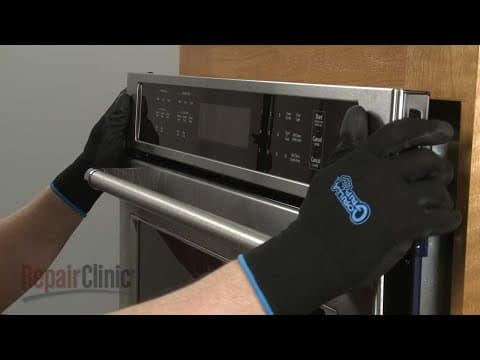
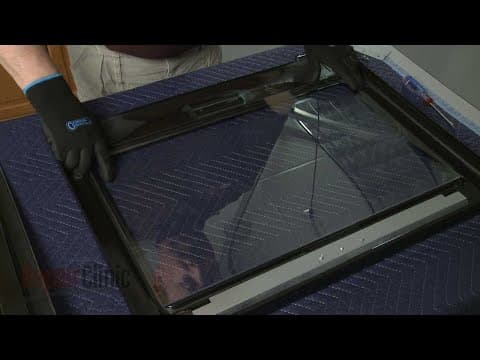
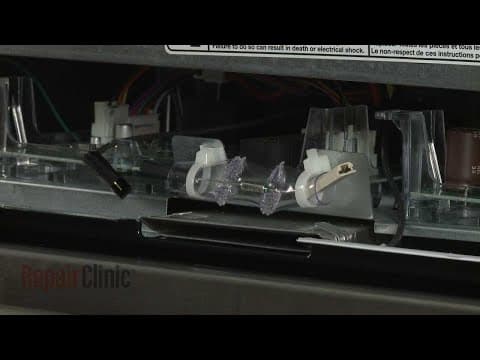

Kitchenaid Double Wall Oven High-Limit Thermostat Replacement #WP4449751
Skill Level
Total Parts Cost
$91.74Estimated Savings
$112.5008:04
- Description
This video provides step-by-step repair instructions for replacing the high-limit thermostat on a Kitchenaid Double Wall Oven (model #KODE500ESS02). The most common reason for replacing the thermostat is if the oven will not stay on after heating up.
All of the information for this oven thermostat replacement video is applicable to the following brands:
Kitchenaid, Whirlpool
Tools used: Phillips-head screwdriver, 1/4" socket or nut driver
All of the information for this oven thermostat replacement video is applicable to the following brands:
Kitchenaid, Whirlpool
Tools used: Phillips-head screwdriver, 1/4" socket or nut driver
Step By Step Instructions
1
KitchenAid Built-In Double Oven - KODE500ESS02
2
Double Wall Oven High-Limit Thermostat Replacement
3
Tools needed: Phillips-head screwdriver, quarter-inch nut driver
4
Shock
5
Before you do this, be sure to shut off the power to the oven junction box.
6
Fully open the top oven door and rotate both door hinge locks back.
7
Partially close the door, then lift and pull the door toward you to remove.
8
With the handle side down, set the door on a blanket.
9
Repeat this procedure to remove the bottom oven door.
10
Using a Phillips-head screwdriver, unthread the two screws to release the bottom vent.
11
Remove all of the oven racks.
12
Now use a Phillips-head screwdriver to unthread the four screws securing the wall oven frame to the cabinet.
13
Heavy
14
Have an assistant help you to carefully lift the appliance out of the cabinet and set it on a piece of cardboard to protect the floor.
15
Be aware that if the conduit cable is not long enough to move the wall oven, you will need to disconnect the power and grounding wires from the junction box.
16
Sharp
17
When replacing the upper oven thermostat, use a quarter-inch nut driver to remove the screws securing the upper rear access panel.
18
If you?re replacing the lower oven cooling thermostat, you will need to remove both the upper and lower rear access panels.
19
To reach the lower thermostat, you will need to remove the cooling fan blower.
20
To do this, first unthread the screws securing the access plate.
21
You will need to disconnect the bake element wires to fully remove the plate.
22
Next, disconnect the cooling fan blower power wires.
23
Unthread the mounting screws and you can remove the component from the rear panel.
24
Now unthread the mounting screw or screws to release the thermostat.
25
Note the orientation of the thermostat wires, then disconnect them from the terminals.
26
Install the new high-limit thermostat by first connecting the wires to the terminals.
27
Position the thermostat and secure it with the mounting screw or screws.
28
Reposition the cooling fan blower on the mounting brackets if necessary, then thread and tighten the screws.
29
Connect the power wires.
30
Realign and secure the access plate.
31
Be sure to reconnect the bake element wires.
32
Replace the rear access panels as required, securing them with the screws.
33
Return the wall oven to the cabinet and push it into position.
34
Confirm that the side trim pieces are in place, then thread the screws to secure the frame to the cabinet.
35
Realign the bottom vent on the oven frame, then thread and tighten the two screws to secure.
36
Replace the oven racks.
37
Reinstall the oven doors by inserting the door hinges into the hinge slots at a forty-five degree angle.
38
Lower the doors to their fully open position, then rotate the hinge locks forward.
39
With the repair completed, turn the power supply back on and the double wall oven should be ready for use.
Description
This video provides step-by-step repair instructions for replacing the high-limit thermostat on a Kitchenaid Double Wall Oven (model #KODE500ESS02). The most common reason for replacing the thermostat is if the oven will not stay on after heating up.
All of the information for this oven thermostat replacement video is applicable to the following brands:
Kitchenaid, Whirlpool
Tools used: Phillips-head screwdriver, 1/4" socket or nut driver
All of the information for this oven thermostat replacement video is applicable to the following brands:
Kitchenaid, Whirlpool
Tools used: Phillips-head screwdriver, 1/4" socket or nut driver
Step-By-Step Instructions
1
KitchenAid Built-In Double Oven - KODE500ESS02
2
Double Wall Oven High-Limit Thermostat Replacement
3
Tools needed: Phillips-head screwdriver, quarter-inch nut driver
4
Shock
5
Before you do this, be sure to shut off the power to the oven junction box.
6
Fully open the top oven door and rotate both door hinge locks back.
7
Partially close the door, then lift and pull the door toward you to remove.
8
With the handle side down, set the door on a blanket.
9
Repeat this procedure to remove the bottom oven door.
10
Using a Phillips-head screwdriver, unthread the two screws to release the bottom vent.
11
Remove all of the oven racks.
12
Now use a Phillips-head screwdriver to unthread the four screws securing the wall oven frame to the cabinet.
13
Heavy
14
Have an assistant help you to carefully lift the appliance out of the cabinet and set it on a piece of cardboard to protect the floor.
15
Be aware that if the conduit cable is not long enough to move the wall oven, you will need to disconnect the power and grounding wires from the junction box.
16
Sharp
17
When replacing the upper oven thermostat, use a quarter-inch nut driver to remove the screws securing the upper rear access panel.
18
If you?re replacing the lower oven cooling thermostat, you will need to remove both the upper and lower rear access panels.
19
To reach the lower thermostat, you will need to remove the cooling fan blower.
20
To do this, first unthread the screws securing the access plate.
21
You will need to disconnect the bake element wires to fully remove the plate.
22
Next, disconnect the cooling fan blower power wires.
23
Unthread the mounting screws and you can remove the component from the rear panel.
24
Now unthread the mounting screw or screws to release the thermostat.
25
Note the orientation of the thermostat wires, then disconnect them from the terminals.
26
Install the new high-limit thermostat by first connecting the wires to the terminals.
27
Position the thermostat and secure it with the mounting screw or screws.
28
Reposition the cooling fan blower on the mounting brackets if necessary, then thread and tighten the screws.
29
Connect the power wires.
30
Realign and secure the access plate.
31
Be sure to reconnect the bake element wires.
32
Replace the rear access panels as required, securing them with the screws.
33
Return the wall oven to the cabinet and push it into position.
34
Confirm that the side trim pieces are in place, then thread the screws to secure the frame to the cabinet.
35
Realign the bottom vent on the oven frame, then thread and tighten the two screws to secure.
36
Replace the oven racks.
37
Reinstall the oven doors by inserting the door hinges into the hinge slots at a forty-five degree angle.
38
Lower the doors to their fully open position, then rotate the hinge locks forward.
39
With the repair completed, turn the power supply back on and the double wall oven should be ready for use.
Applicable Product Model


Related Articles & Videos
03:31
Part Replacement
Kitchenaid Double Wall Oven Control Panel Assembly (Black) Replacement #W11087449
02:50
Part Replacement
Kitchenaid Double Wall Oven Inner Door Glass Replacement #W10827059
08:02
Part Replacement
Kitchenaid Double Wall Oven Cooling Fan Blower Replacement #W10861504




Our Story
Family-owned and operated since 1912, Burke America Parts Group is the longest-running genuine appliance, HVAC, and outdoor power equipment parts solution in North America. At Repair Clinic, we're proud to be an international brand trusted by the pros as well as the DIY community.
About Repair Clinic
© 2026 RepairClinic.com