

Price Match Guarantee

In-stock parts ship the same day

365-Day Return Policy
Price Match GuaranteeGET PRO PRICING
Video & Articles: Appliance & Equipment RepairKitchenaid Microwave Convection Fan Motor Replacement #W10920268 


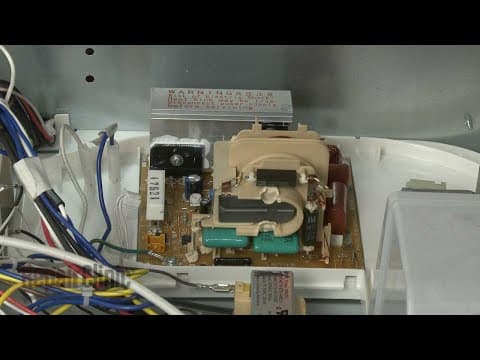
Kitchenaid Microwave Convection Fan Motor Replacement #W10920268
Skill Level
Total Parts Cost
$68.33Estimated Savings
$112.5005:15
- Description
This video provides step-by-step repair instructions for replacing the convection fan motor on a Kitchenaid microwave (Model #KMBP100ESS01). The most common reason for replacing the motor is if the convection setting on the microwave is not working.
All of the information for this motor replacement video is applicable to the following brands:
Kitchenaid, Whirlpool
Tools used: multi-screwdriver
All of the information for this motor replacement video is applicable to the following brands:
Kitchenaid, Whirlpool
Tools used: multi-screwdriver
Step By Step Instructions
1
Microwave Oven -Model KMBP100ESS01
2
KitchenAid Built-In Microwave Oven Convection Fan Motor Replacement
3
ATTENTION: TOOLS & ASSISTANCE NEEDED:
4
"Step 1: You will need a Phillips-head screwdriver, a T-10 Torx bit, a T-20 Torx bit, a 5/16th inch socket or nut driver, and an assistant to help move heavy microwave."
5
"Step 2: Before you begin, be sure to turn off the power supply to the oven junction box. "
6
Step 3: Open the oven door and remove any racks from the oven along with the turntable and support.
7
Step 4: Now use a Phillips-head screwdriver to unthread the two screws securing the mounting flanges to the cabinet.
8
Step 5: Remove the washers as well if still intact.
9
Step 6: Now have an assistant to help you pull the appliance out of the cabinet and set it on a sturdy surface.
10
Step 7: Be aware that if the conduit cable is not long enough to move the microwave oven you will need to disconnect the power and grounding wires and remove the conduit cable from the junction box.
11
Step 8: Use a T-10 Torx bit to unthread the two screws securing the rear cover.
12
Step 9: Lift the cover up to detach.
13
Step 10: Use a T-20 Torx bit to unthread the six screws securing the convection housing.
14
Step 11: Support the housing as you detach the temperature sensor bracket.
15
Step 12: Turn the housing around and use a 5/16th inch socket or nut driver to loosen the fan blade mounting nut by rotating it clockwise.
16
Step 13: Fully unthread the nut and remove the blade.
17
Step 14: Slide the washer off of the motor shaft.
18
Step 15: Disconnect the fan motor wires and rotate the old motor counter-clockwise to detach it from the housing.
19
Step 16: Install the new convection fan motor by inserting the mounting tabs in the housing notches then rotate the motor clockwise to lock it into place.
20
Step 17: Confirm that the motor terminals are facing straight up and connect the wires to the terminals.
21
Step 18: Slide the washer onto the motor shaft.
22
"Step 19: Align the fan blade on the shaft, then thread the mounting nut on counter-clockwise and tighten. "
23
Step 20: reposition the housing on the rear of the oven and replace the temperature sensor bracket.
24
Step 21: Thread and tighten the six screws to secure the housing.
25
Step 22: Align the rear cover on the tabs then fully position the cover and secure it with the screws.
26
"Step 23: With an assistant, return the microwave oven to the cabinet and push it into position. "
27
Step 24: Insert the washers into the holes in the flanges then thread the two screws to secure the flanges to the cabinet.
28
Step 25: Replace the support and align the turntable on the coupling.
29
Step 26: Turn on the power supply back on to the microwave.
30
Congrats! Your microwave oven is ready for use.
Description
This video provides step-by-step repair instructions for replacing the convection fan motor on a Kitchenaid microwave (Model #KMBP100ESS01). The most common reason for replacing the motor is if the convection setting on the microwave is not working.
All of the information for this motor replacement video is applicable to the following brands:
Kitchenaid, Whirlpool
Tools used: multi-screwdriver
All of the information for this motor replacement video is applicable to the following brands:
Kitchenaid, Whirlpool
Tools used: multi-screwdriver
Step-By-Step Instructions
1
Microwave Oven -Model KMBP100ESS01
2
KitchenAid Built-In Microwave Oven Convection Fan Motor Replacement
3
ATTENTION: TOOLS & ASSISTANCE NEEDED:
4
"Step 1: You will need a Phillips-head screwdriver, a T-10 Torx bit, a T-20 Torx bit, a 5/16th inch socket or nut driver, and an assistant to help move heavy microwave."
5
"Step 2: Before you begin, be sure to turn off the power supply to the oven junction box. "
6
Step 3: Open the oven door and remove any racks from the oven along with the turntable and support.
7
Step 4: Now use a Phillips-head screwdriver to unthread the two screws securing the mounting flanges to the cabinet.
8
Step 5: Remove the washers as well if still intact.
9
Step 6: Now have an assistant to help you pull the appliance out of the cabinet and set it on a sturdy surface.
10
Step 7: Be aware that if the conduit cable is not long enough to move the microwave oven you will need to disconnect the power and grounding wires and remove the conduit cable from the junction box.
11
Step 8: Use a T-10 Torx bit to unthread the two screws securing the rear cover.
12
Step 9: Lift the cover up to detach.
13
Step 10: Use a T-20 Torx bit to unthread the six screws securing the convection housing.
14
Step 11: Support the housing as you detach the temperature sensor bracket.
15
Step 12: Turn the housing around and use a 5/16th inch socket or nut driver to loosen the fan blade mounting nut by rotating it clockwise.
16
Step 13: Fully unthread the nut and remove the blade.
17
Step 14: Slide the washer off of the motor shaft.
18
Step 15: Disconnect the fan motor wires and rotate the old motor counter-clockwise to detach it from the housing.
19
Step 16: Install the new convection fan motor by inserting the mounting tabs in the housing notches then rotate the motor clockwise to lock it into place.
20
Step 17: Confirm that the motor terminals are facing straight up and connect the wires to the terminals.
21
Step 18: Slide the washer onto the motor shaft.
22
"Step 19: Align the fan blade on the shaft, then thread the mounting nut on counter-clockwise and tighten. "
23
Step 20: reposition the housing on the rear of the oven and replace the temperature sensor bracket.
24
Step 21: Thread and tighten the six screws to secure the housing.
25
Step 22: Align the rear cover on the tabs then fully position the cover and secure it with the screws.
26
"Step 23: With an assistant, return the microwave oven to the cabinet and push it into position. "
27
Step 24: Insert the washers into the holes in the flanges then thread the two screws to secure the flanges to the cabinet.
28
Step 25: Replace the support and align the turntable on the coupling.
29
Step 26: Turn on the power supply back on to the microwave.
30
Congrats! Your microwave oven is ready for use.
Applicable Product Model


Related Articles & Videos




Our Story
Family-owned and operated since 1912, Burke America Parts Group is the longest-running genuine appliance, HVAC, and outdoor power equipment parts solution in North America. At Repair Clinic, we're proud to be an international brand trusted by the pros as well as the DIY community.
About Repair Clinic
© 2026 RepairClinic.com