

Price Match Guarantee

In-stock parts ship the same day

365-Day Return Policy
Price Match GuaranteeGET PRO PRICING
Video & Articles: Appliance & Equipment RepairMantis Tiller Worm Gear Bearing Replacement #432


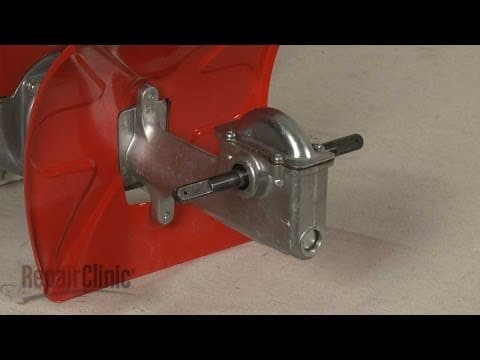

Mantis Tiller Worm Gear Bearing Replacement #432
Skill Level
Total Parts Cost
$10.94Estimated Savings
$112.5004:32
- Description
This video provides step-by-step instructions for replacing a worm gear bearing on Mantis tillers. The most common reason for replacing a worm gear bearing is if it is worn, which causes the tiller to leak grease.
All of the information in this bearing replacement video is applicable to the following brands: Mantis
Tools used: adjustable wrench, Phillips head screwdriver, hammer, flat-head screwdriver
All of the information in this bearing replacement video is applicable to the following brands: Mantis
Tools used: adjustable wrench, Phillips head screwdriver, hammer, flat-head screwdriver
Step By Step Instructions
1
Before you replace a worm gear bearing on your tiller make sure the engine has cooled and the on-off switch is in the “off” position.
2
We recommend performing this procedure with little or no fuel in the tank.
3
Now tip the tiller forward so it rests on the fuel tank and tine guard.
4
Note the orientation of the tines then remove the retaining pins and pull off both tine assemblies.
5
Next, use an adjustable wrench to rotate the tine drive shaft counter-clockwise to unthread it then remove the drive shaft along with the left side retainer, seal and bearing.
6
If you need to replace the bearing on the right side of the housing, use a phillips-head screwdriver to unthread the screws securing the cover then pull it off.
7
Lift out the worm gear.
8
Now insert the tine drive shaft in the reverse position and strike it with a hammer to knock out the old worm gear bearing.
9
Install the new worm gear bearing by fully seating it in the transmission housing.
10
The bearing should be recessed approximately a quarter-inch.
11
Replace the seal and align the retainer.
12
Fully seat the retainer.
13
Now reposition the worm gear and add some additional grease if necessary.
14
Confirm that the gasket is in place then realign the cover and secure it with the screws.
15
Rethread the tine drive shaft clockwise into the left side of the transmission housing.
16
Align the left worm gear bearing on the shaft and fully seat it in the housing.
17
Replace the seal and the retainer.
18
Properly align each tine assembly on the tine drive shaft and secure them with the retaining pins.
19
With the repair completed return the tiller to its upright position.
Description
This video provides step-by-step instructions for replacing a worm gear bearing on Mantis tillers. The most common reason for replacing a worm gear bearing is if it is worn, which causes the tiller to leak grease.
All of the information in this bearing replacement video is applicable to the following brands: Mantis
Tools used: adjustable wrench, Phillips head screwdriver, hammer, flat-head screwdriver
All of the information in this bearing replacement video is applicable to the following brands: Mantis
Tools used: adjustable wrench, Phillips head screwdriver, hammer, flat-head screwdriver
Step-By-Step Instructions
1
Before you replace a worm gear bearing on your tiller make sure the engine has cooled and the on-off switch is in the “off” position.
2
We recommend performing this procedure with little or no fuel in the tank.
3
Now tip the tiller forward so it rests on the fuel tank and tine guard.
4
Note the orientation of the tines then remove the retaining pins and pull off both tine assemblies.
5
Next, use an adjustable wrench to rotate the tine drive shaft counter-clockwise to unthread it then remove the drive shaft along with the left side retainer, seal and bearing.
6
If you need to replace the bearing on the right side of the housing, use a phillips-head screwdriver to unthread the screws securing the cover then pull it off.
7
Lift out the worm gear.
8
Now insert the tine drive shaft in the reverse position and strike it with a hammer to knock out the old worm gear bearing.
9
Install the new worm gear bearing by fully seating it in the transmission housing.
10
The bearing should be recessed approximately a quarter-inch.
11
Replace the seal and align the retainer.
12
Fully seat the retainer.
13
Now reposition the worm gear and add some additional grease if necessary.
14
Confirm that the gasket is in place then realign the cover and secure it with the screws.
15
Rethread the tine drive shaft clockwise into the left side of the transmission housing.
16
Align the left worm gear bearing on the shaft and fully seat it in the housing.
17
Replace the seal and the retainer.
18
Properly align each tine assembly on the tine drive shaft and secure them with the retaining pins.
19
With the repair completed return the tiller to its upright position.


Related Articles & Videos




Our Story
Family-owned and operated since 1912, Burke America Parts Group is the longest-running genuine appliance, HVAC, and outdoor power equipment parts solution in North America. At Repair Clinic, we're proud to be an international brand trusted by the pros as well as the DIY community.
About Repair Clinic
© 2026 RepairClinic.com